
Start with the work
| Ask | Write down |
|---|---|
| What is the task? | A member renews |
| What goes wrong? | Fee chase is missed |
| What must work? | Record, payment, reply |
Test one whole job, not a list of features.
The download gives your committee space to compare all three options.
What are the three options?
A spreadsheet is a file you shape around your work. You choose the columns, formulas and people who can edit it. Excel and Google Sheets are familiar examples.
Ready-made club management software is an app built for tasks such as renewals and bookings. It is also called off-the-shelf software. You choose its settings, but the supplier controls the main design.
A bespoke or custom build is software made for an agreed set of needs. It can fit a task closely. Your club must also plan for support, fixes, hosting and future changes.
| Question | Spreadsheet | Ready-made app | Custom build |
|---|---|---|---|
| Who shapes it? | Your sheet owner. | The supplier, with club settings. | Your club and the build team. |
| What is the usual starting point? | Rows, columns and formulas. | A set of working club tasks. | A written brief and tested requirements. |
| Who maintains it? | Your club maintains the file. | The supplier maintains the app. | The team named in your support agreement. |
| What should you test? | Formula checks, access and handover. | Real tasks, limits and export. | Task fit, acceptance checks and long-term support. |
When a spreadsheet is enough
A simple list can be the right tool. A few people may keep it up to date without much effort. A one-off budget may need no more than a checked formula and a named owner.
Do not buy an app just because someone says spreadsheets cannot be shared. Google Sheets supports shared access, version history and protected ranges. Excel supports co-authoring with suitable versions and cloud storage.
Spreadsheets can also be linked to scripts and other tools. That adds setup and upkeep. The fair question is not whether a sheet can do something. It is who will build it, check it and keep it working when a volunteer leaves.
When to test ready-made club software
Look at tasks that cross more than one list. A member renews, pays a fee and gets a place in a session. A helper swaps a duty and someone checks they can do the role.
If a person keeps copying each change into several places, linked software may help. A label in a cell is different from an action that updates the right record and tells the right person.
Test the whole job with made-up data. Start the renewal, record the payment and find the result. Ask what happens if it fails halfway through. A polished dashboard is not proof that the awkward case works.
For a session, try taking attendance and changing a booking. Test reminders too. Send a message to your own test email address and check what arrives. Keep real members out of the trial.
There is no magic member count at which every club needs software. A small club with many shared boats and duties can have more moving parts than a larger club with one simple annual fee.
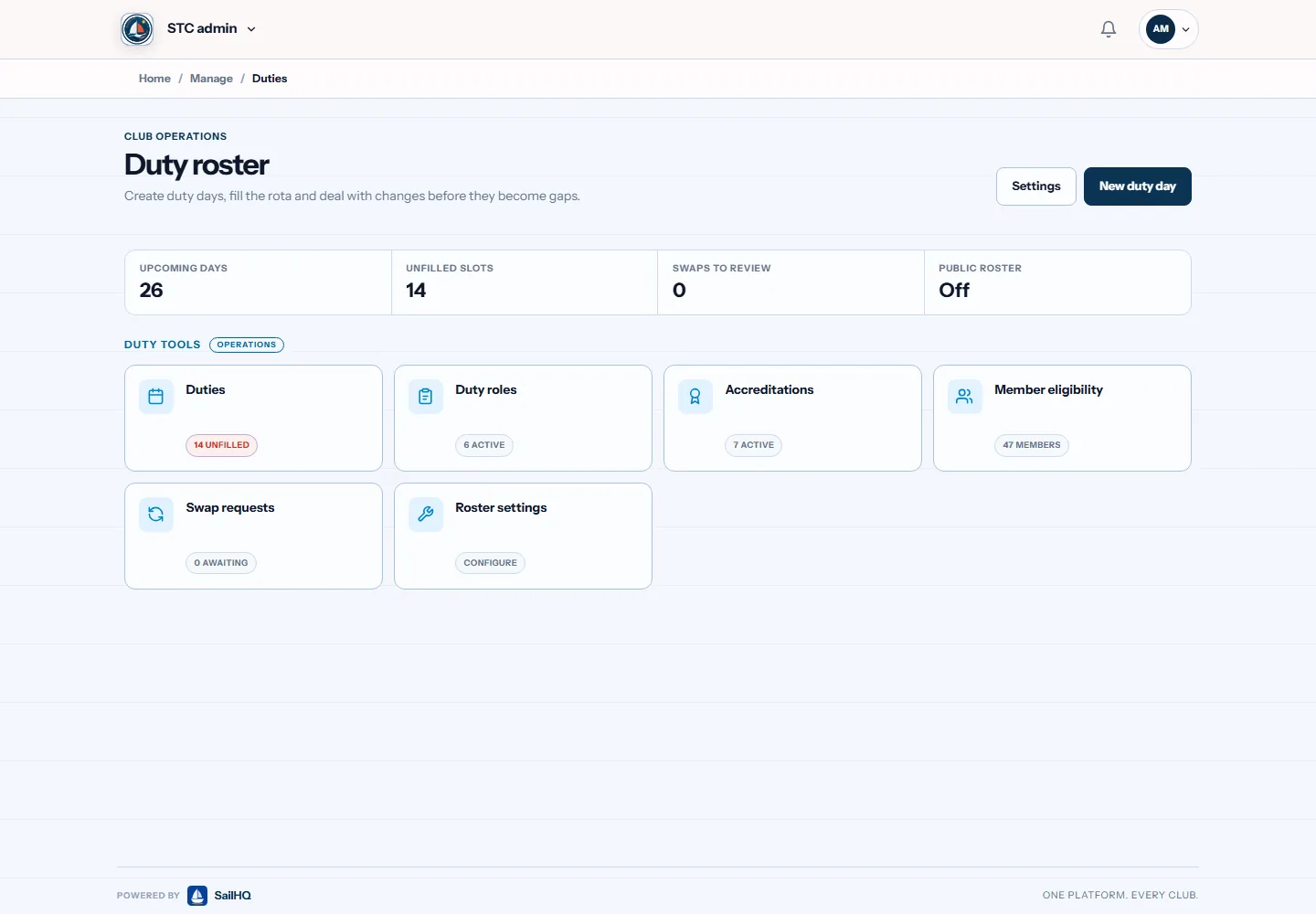
One duty swap, shown both ways
With our rota download, you record the date, role and named helper. If Alex wants to swap, someone must find a replacement, check their skills, agree the change and update the row. The overlap check helps, but it does not approve the swap.
SailHQ has duty roles, member eligibility and swap requests in its duty tools. Its public guide describes a request and approval flow. That is a concrete task to ask for in a sailing-club demo.
An app still needs sound club rules and accurate records. Do not treat a green status as proof of a person's skills. Decide who can approve a role and how evidence is kept current.
When does a custom build make sense?
Write down the task an existing tool cannot do. Show why it matters. A rule about crew, craft or booking may be important. A wish to move a button is rarely a reason for a whole new system.
First ask whether a ready-made app can handle the need through its settings. Some needs may fit a smaller extension. Make the choice after a real task test, not before it.
For a new build, agree what counts as finished. Name the people who will test it. Put ownership, data access, support and exit terms in writing. Ask what happens if the original developer is no longer available.
SportsHQ offers custom builds, so we have a commercial interest here. That is not a reason to recommend one to every club. Our first choice is the smallest setup that meets the real need.
Compare the full cost
List setup, ongoing fees, payment charges, storage and support. Ask which currency the supplier bills in. Check what happens as member numbers rise or your needs change.
Include the club's own work. Log the hours volunteers spend on each task before trying a new tool. Repeat the task in the trial and compare the effort. Count setup and training too. Use your own results, not promised time savings.
Ask for the full price and renewal terms in writing. Price bands differ between the HQ apps. Use the linked product pricing, not an old screenshot or a fee copied from a different sport.
Keep people's details safe
An app does not settle your club's data protection duties. UK GDPR is part of UK law on personal data. Names, contact details and payment records need care in a spreadsheet or an app.
List the details you need and why you keep them. Check who can view or change each part. Review access when a volunteer leaves. Ask the supplier to show how you can find and export one person's records.
Read the ICO's current guidance when choosing a tool. The ICO says clubs must assess whether a product suits their use. These checks are a starting point, not a full legal review.
Use the committee test sheet
Do not let a total score hide a failed must-have task. If you cannot export the records you need, a pretty calendar does not make up for it. Use the worksheet to record the reason for your choice.
Keep that note for the next committee. It should explain what you bought, what you left out and who owns the next step. That is more useful at handover than a folder full of sales brochures.
- Choose one task that causes real trouble.
- Write the result you need in plain words.
- Try that task in each option with fictional records.
- Let a second volunteer repeat it without help.
- Export the test records and open the file.
- Record the limits, cost and support before choosing.
Common questions
Must we stop using all spreadsheets?
No. You may keep a budget sheet while using an app for members and duties. Decide which place owns each record. Avoid editing the same live record in two places without a clear process.
Is a bespoke system always better?
No. It can fit a special need, but it also needs support and maintenance. If a ready-made app handles your important tasks, a new build may add work without a useful gain.
Do these downloads connect to the HQ apps?
No. They are standalone files. Imports and exports vary by app. Ask what fields can be moved and test a small fictional sample before planning a change.
Sources and limits
SportsHQ made these examples and downloads. The figures are fictional. Source pages were checked on 10 September 2026. Guidance and product features can change.
- Microsoft: supported Excel co-authoring
- Google: Sheets sharing and version history
- SailHQ: spreadsheet and duty workflows
- ICO: choosing tools that hold personal data
We build club software. This guide is general help, not legal, tax or safety advice. We are not linked to Microsoft or Google. Check the file in your own software before adding club records.