
A renewal check, in two rows
| Member | Still owed | Renewal |
|---|---|---|
| Alex Example | 20 | Due |
| Pat Example | 0 | Current |
Check date: 2026-09-10
These are fictional members, not club records.
Keep the member list small and useful
The tracker is for one fee period at a time. It holds up to 500 records. Use it for a list of members, their next renewal dates and their fee totals. It is not a log of every payment.
Give each membership a stable ID, such as M-001. Names can change. Two people can have the same name. An ID makes it easier to match the right fee to the right person.
Name, renewal date, fee due and paid total are the main inputs. Email and group are optional. Do not collect extra details just because there is space for them.
| Field | Use it for |
|---|---|
| Member ID | Match records without relying on names. |
| Renewal date | Set the day this membership needs review. |
| Fee due | Enter the agreed fee for this period. |
| Paid | Enter the total received for this fee. |
| Still owed | Let the formula show the unpaid amount. |
Run your first renewal check
Update B4 each time you review the list. The date does not move on its own. That makes an old saved report easy to understand: it shows what was due on the day you checked.
- Download the workbook and save a private club copy.
- Open Blank. Enter the date of your check in B4.
- Add one member per row, starting at row 8.
- Enter the fee and paid total. Use 0 where no money is due or received.
- Review Row check. Resolve missing fields and duplicate IDs.
- Filter Renewal to Due or Due soon.
- Check the payment proof before sending a personal reminder.
What do the renewal labels mean?
Due means the renewal date is on or before your check date. Due soon means it falls in the next 30 days. Current means it falls after that.
A renewal date and a payment are different things. A person may have paid in full but still need to renew their membership. A new member may have a current date but still owe part of the fee.
Read both columns before you act. The sheet will not end a membership, charge a card or send an email. A committee member still decides what to do next.
Try a part-paid membership
In Example, Alex owes a fee of 120 and has paid 100. Still owed shows 20. The renewal date is 1 September 2026. With a check date of 10 September, the label is Due.
Pat has paid the full 120. Pat's renewal date is 1 January 2027. Still owed is 0 and the label is Current.
Change Alex's paid total to 120. The balance should become 0. The renewal label should stay Due. This tests the difference between paying a fee and renewing a membership.
If you enter 130, the file flags Overpaid. The balance will not go below zero. Find out whether the extra 10 is a gift, a mistake or a sum to return. Keep that decision in the payment record.
Protect the people behind the rows
A name and email address are personal data. Keep the file private and give access only to people who need it. Do not use a public link for the full member list.
The UK ICO says small groups should know what personal data they hold and why. It also says to keep only what is needed and explain its use. A spreadsheet does not make your club compliant on its own.
This starter file leaves out card details, health notes and child records. Those need a separate, suitable process. Do not add a hidden tab for them and assume it is secure.
Agree when old records will be reviewed and removed. Change access when a volunteer leaves their role. Follow your club's privacy notice and current guidance.
Opening and sharing your file
The download is an .xlsx file. Open it in Excel, or use File, Import, Upload in Google Sheets. Recheck the example figures and dates after import. Colours and lists may look different.
Google Sheets offers viewer, commenter and editor access. It also has version history. Give editing rights only to people who maintain the list. A committee member who reads totals may not need to edit them.
Keep a dated copy before a large update. Use the filter on the full table. Sorting just one column can pair one person's name with someone else's fee.
See the same job in RowHQ
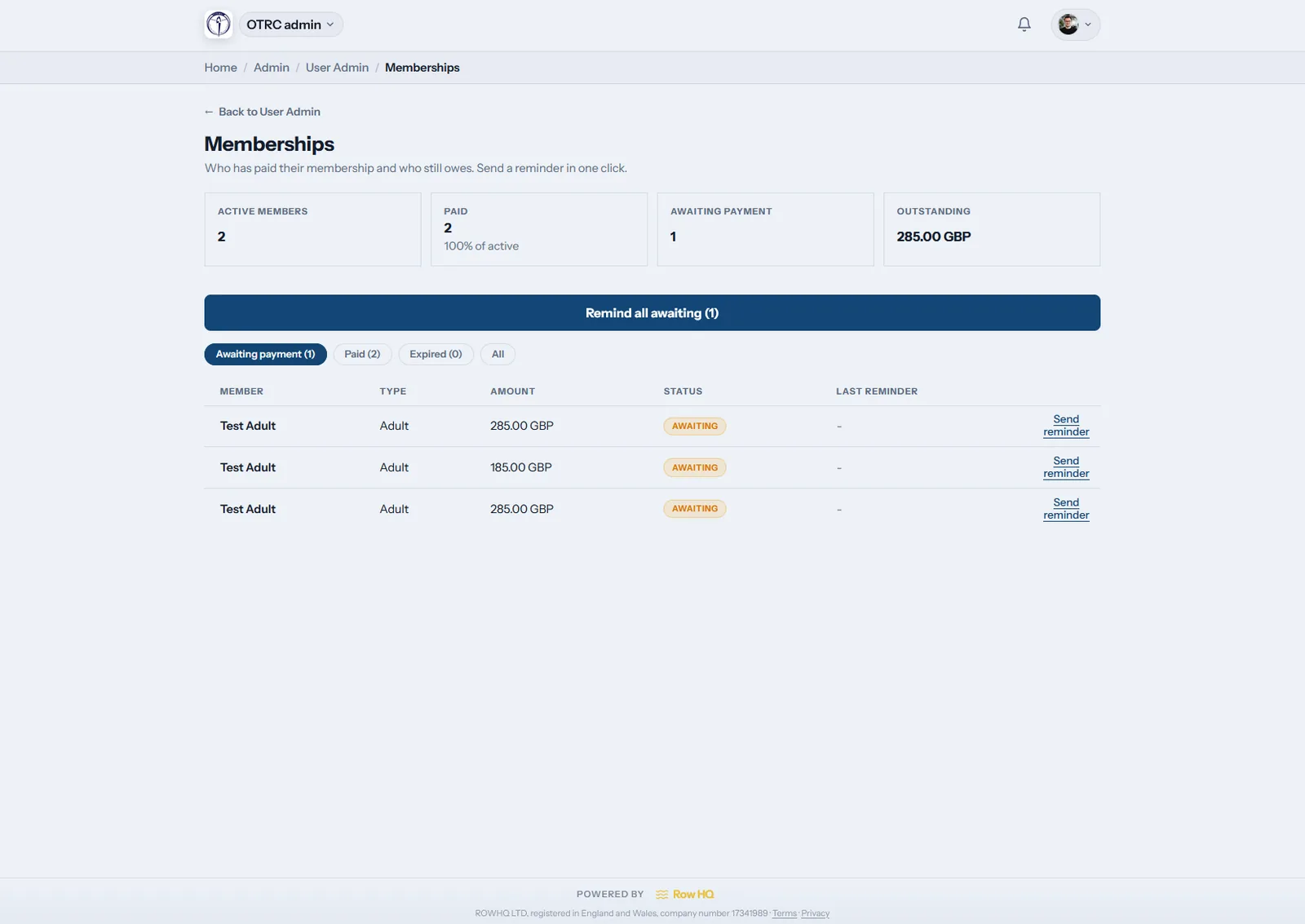
The RowHQ screen below shows membership payments and reminder actions. You can see the step beyond a fee list: the person who owes a fee is linked to an action the club can take.
Our tracker stops at showing the record. Someone still checks the bank, changes the paid total and sends a message. If that work is manageable, keep the sheet. If it is the job you keep putting off, test the app with sample records.
Use your own membership rules in that test. Ask to see a part-payment, a family fee and a refund if your club uses them. Do not assume every sport app handles each case in the same way.
Common questions
Can the file send renewal emails?
No. It marks dates and balances for you to review. You send any reminder yourself. There are no scripts, email tools or payment links hidden in the download.
Can I use one row for a family?
Only if one row matches the membership you charge for. This simple file has no linked family members. Keep a clear note of what the row covers. Use a fuller system if each person needs a separate record.
Do I need to buy Excel?
You can try the file in Google Sheets using the import steps above. We have not checked it in that service. Test the sample totals and dates before adding your own records.
Sources and limits
SportsHQ made these examples and downloads. The figures are fictional. Source pages were checked on 10 September 2026. Guidance and product features can change.
- ICO: common data protection questions
- Google: sharing, filters and protected ranges
- RowHQ: membership workflows and spreadsheets
We build club software. This guide is general help, not legal, tax or safety advice. We are not linked to Microsoft or Google. Check the file in your own software before adding club records.